
A visit, step by step
Screens from our live demo, with sample data.


-
01
Welcome and language
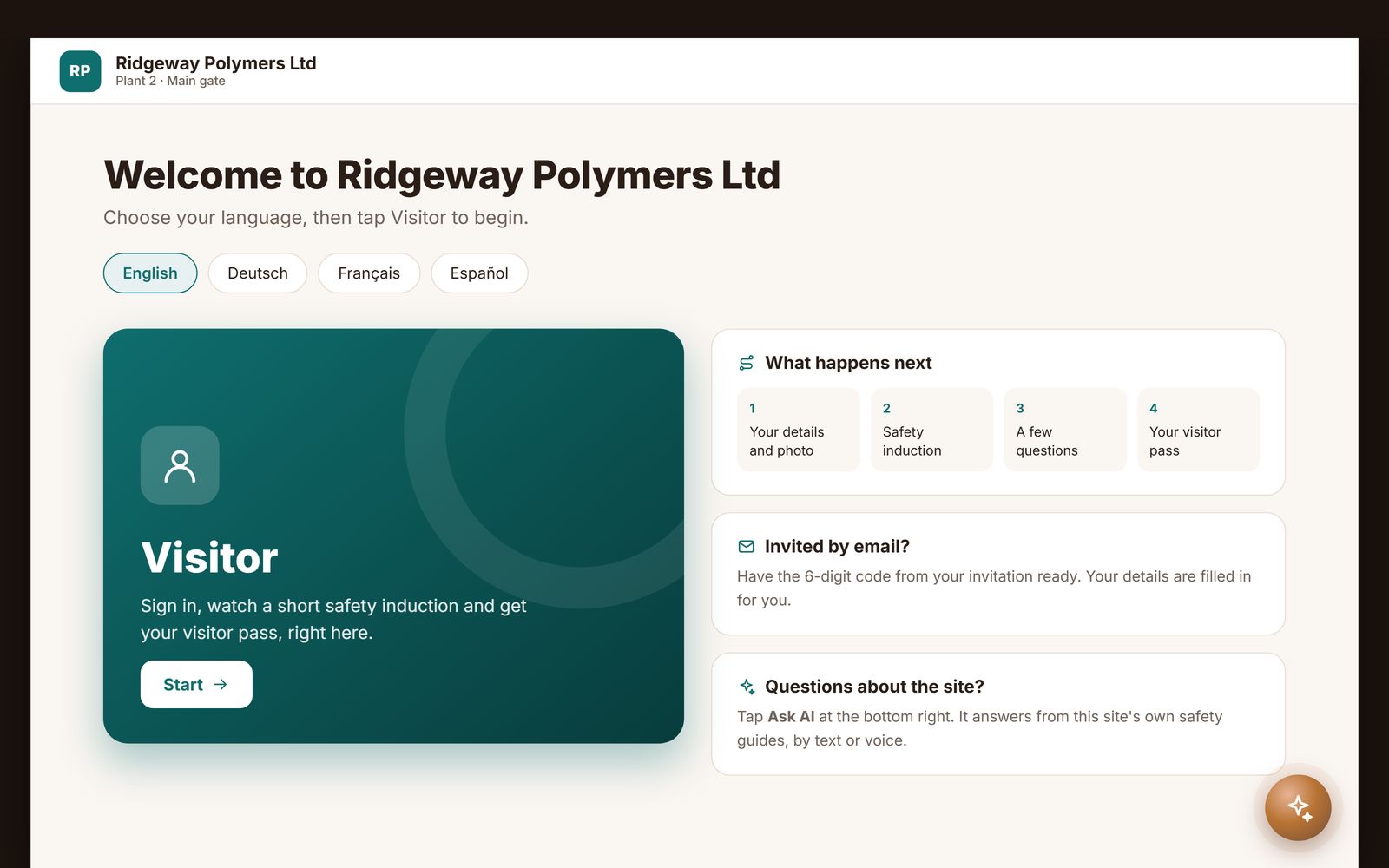
The visitor picks a language and taps Visitor. An invited guest types the 6-digit code from their email and their details are filled in.
-
02
Details and photo
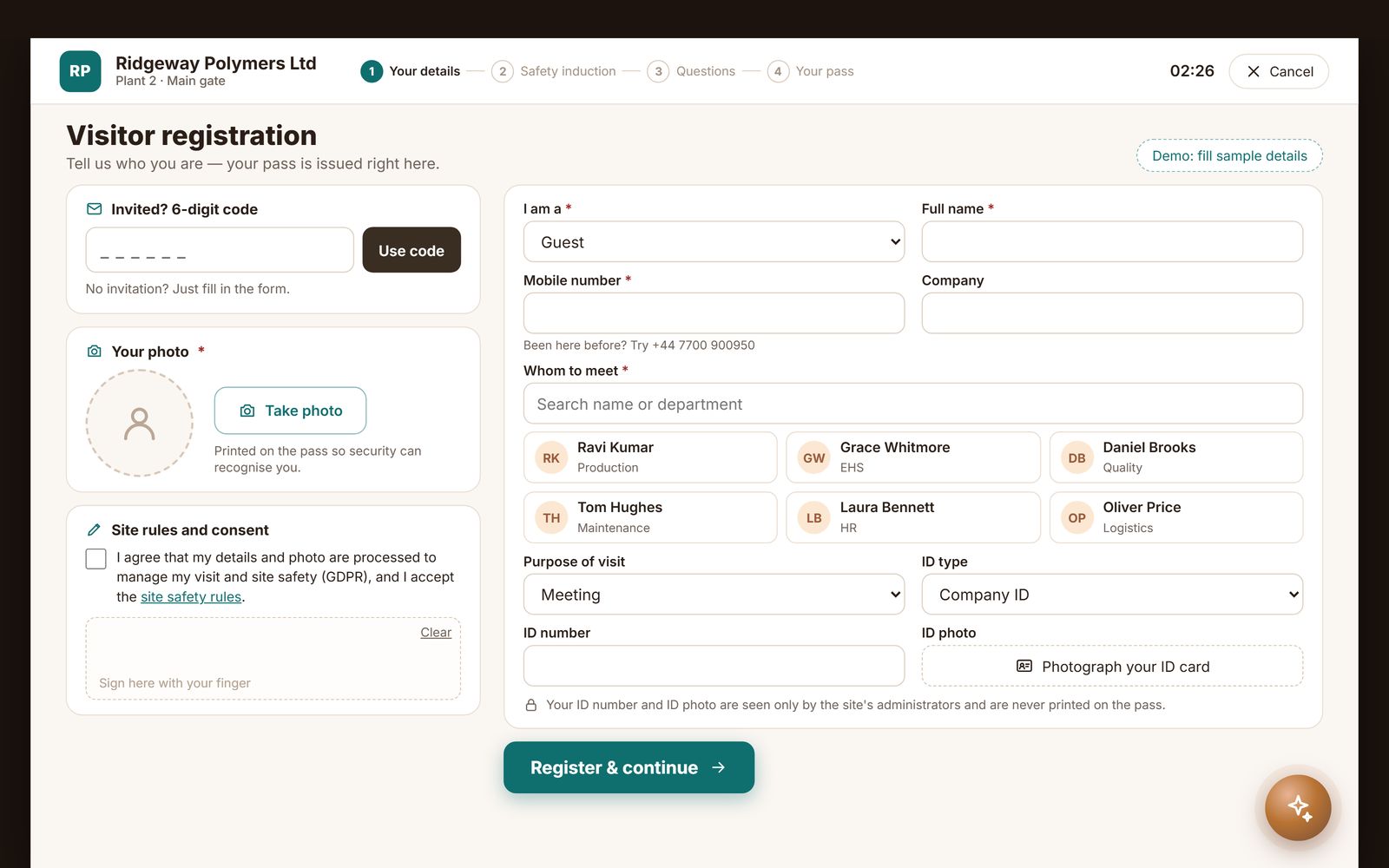
Name, company, the person they are visiting, the purpose of the visit and a photo, with consent, on the kiosk, a tablet or their own phone.
-
03
Safety induction
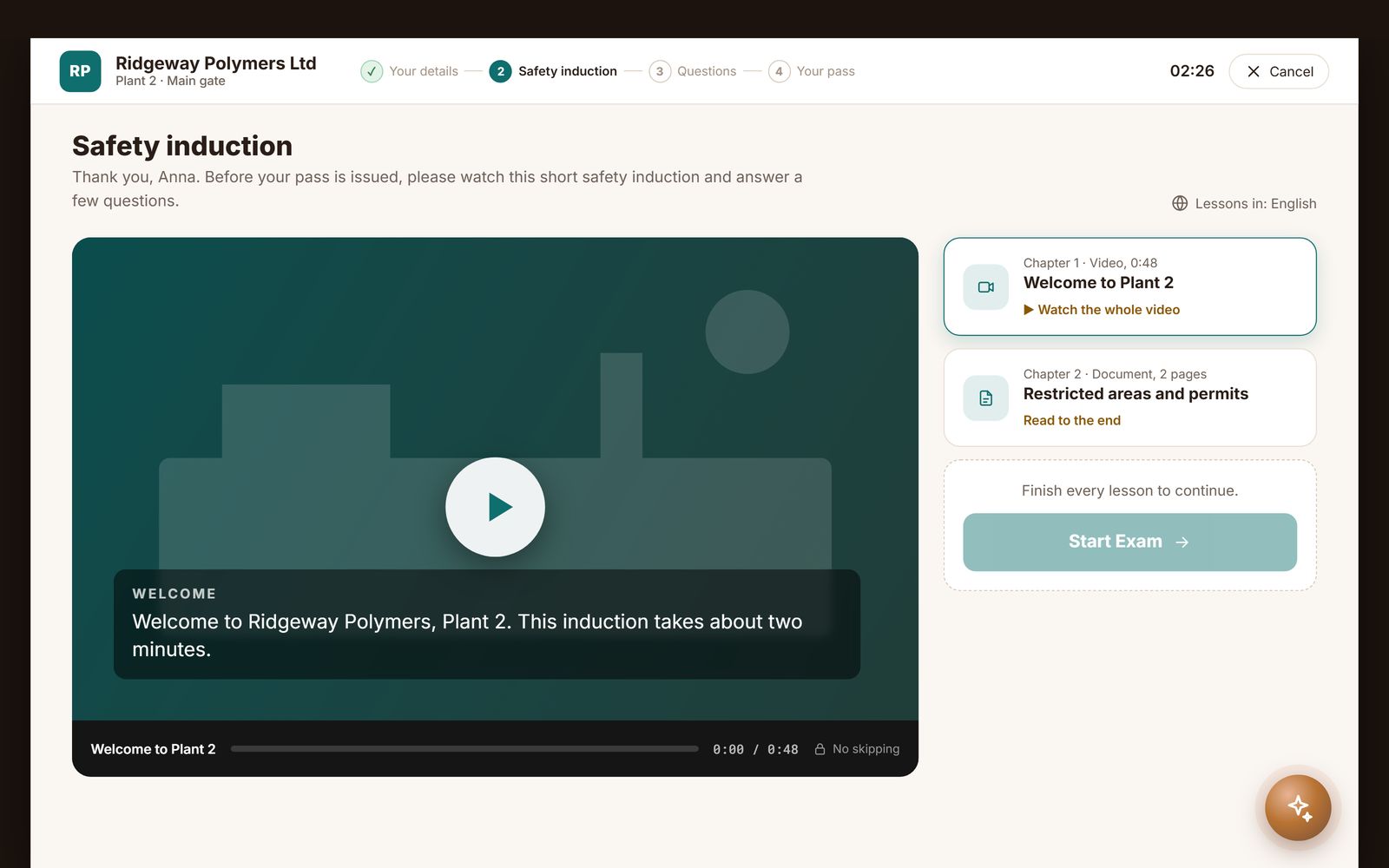
A short video and document they cannot skip, then a few questions before the pass is issued.
-
04
Visitor pass
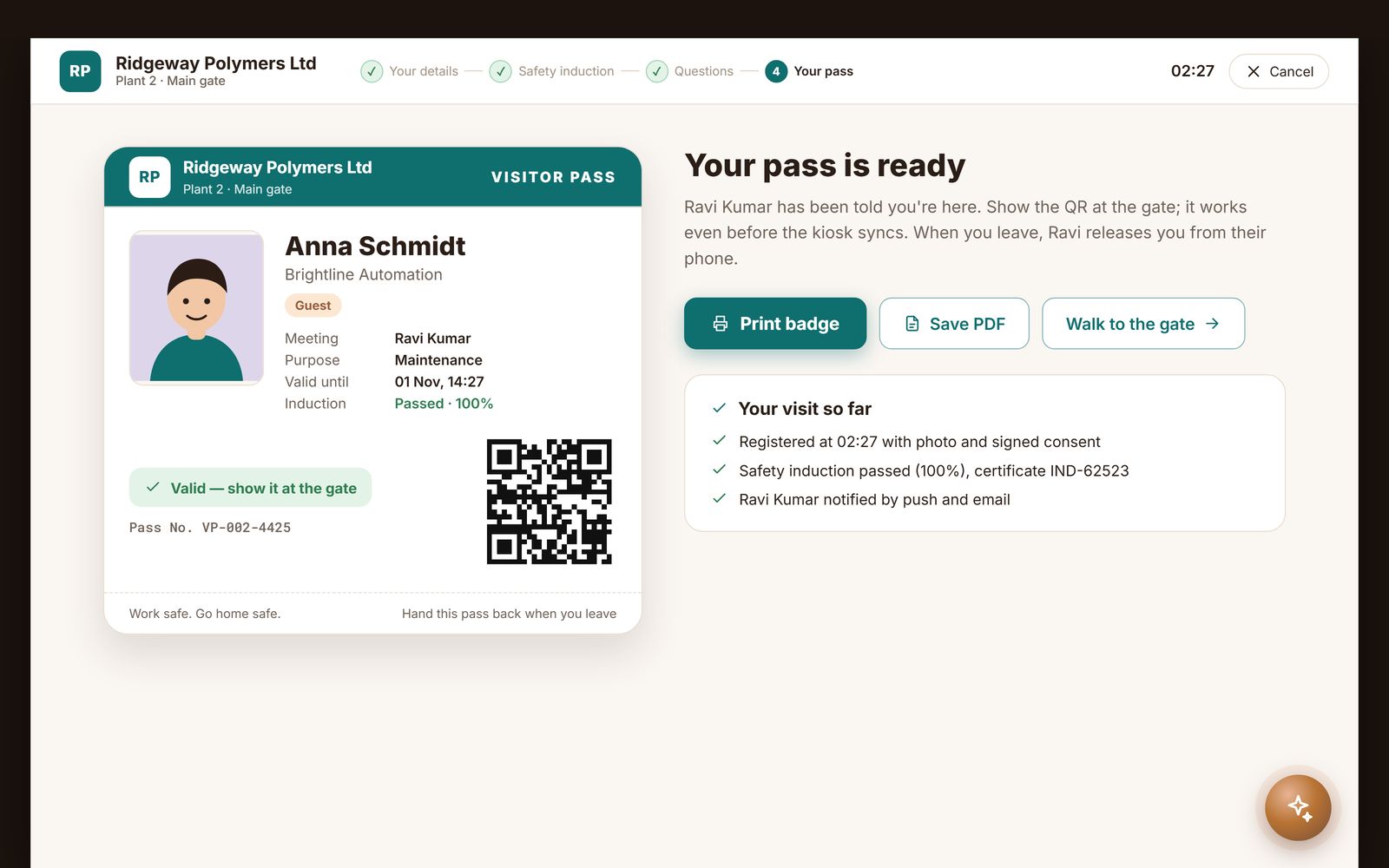
A pass with a QR code to print or keep on the phone. The host is told by push and email, and the gate scans the QR.
-
05
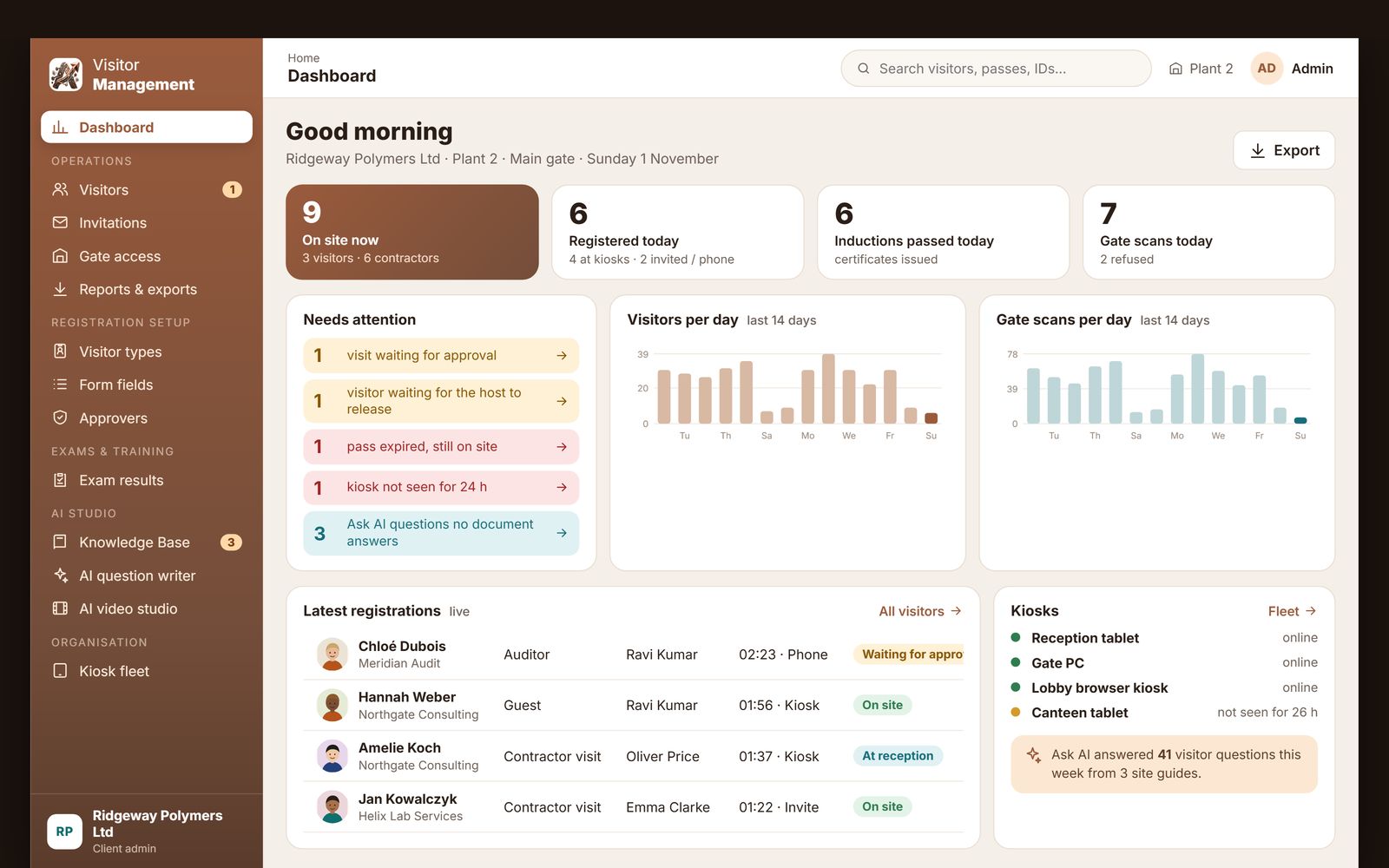
Admin portal
Who is on site now, visits waiting for approval, gate scans per day and exports, across every kiosk.
What is visitor management software?
Visitor management software replaces the paper visitor book and the receptionist's memory with a digital record of everyone who comes to a site: who they are, whom they are visiting, whether the visit was approved, whether they saw the site's safety briefing, when they came through the gate and when they left. The visitor registers on a kiosk, a tablet or their own phone, the host is told at once, the gate scans a QR pass, and the record closes when the visitor signs out. The result is a reliable answer to the questions every office, plant and construction site is eventually asked: who is on the premises right now, and who was here on a given day.
AtashiTech's visitor management software is one platform with several front doors: an Android tablet kiosk, a Windows kiosk application for floor-standing hardware, a browser kiosk that runs on any screen, phone pages the visitor opens from a QR poster with nothing to install, an Android app for hosts, approvers and guards, and a web portal for administrators. It is part of our visitor and site safety solutions, alongside contractor and employee induction. Ask for a 14-day free trial from this page: we set up your account and email you the login.
Try the visitor journey before we talk
Walk through the kiosk the way a guest does, from the welcome screen to the visitor pass.
Pick a sample site (a factory, an office or a construction site) and how the guest arrives: walking in, with an invitation code, or needing the host's approval. Enter the details, take the photo, watch the safety induction, answer the questions and get the pass. Then scan the pass at the gate. It runs in your browser with sample data.
Why the front desk is still the weak point
Most sites already have a process for visitors. The trouble is that the process depends on whoever happens to be at the desk that morning.
The old way
A visitor arrives and waits while the receptionist finishes a call. They write their name, company and mobile number in a register that the previous forty visitors also wrote in, which means every one of those forty can read it. A laminated pass is handed over, usually the same one as yesterday. Nobody asks the visitor to watch the site's safety rules, and when they leave nobody notices, so the register shows them as still inside.
That process fails in predictable ways. An auditor asks who was on the production floor in March and the answer is a carton of registers. Under the GDPR in Europe and the UK, India's DPDP Act and similar laws elsewhere, the open visitor book is personal data on public display, and most data-protection advisers now describe it as hard to defend. None of this is a staff failure. It is the limit of a manual system.
The better way
The software owns the routine part of the visit so that people can own the exceptions. An invited visitor types their invitation code and the form is already filled; a returning visitor is recognised by mobile number; a walk-in fills a short form the site designed. The photo, the ID details, the safety briefing and the approval all happen inside the same flow, and the host is notified the moment the visitor registers. Reception still greets people; it no longer transcribes them.
Four steps from arrival to sign-out
The flow below is the default. Visitor types, form fields, approval rules and the induction are configured per site from the web portal, so a corporate lobby and a factory gate can share one account and behave differently.
Invite or walk in
An administrator invites guests from the portal, or a host invites them from the phone app, and each guest receives a six-digit invitation code by email. Walk-ins register on the kiosk or scan the QR poster and register on their own phone. A returning visitor's details are pre-filled from their mobile number.
Register and induct
The visitor enters the fields the site requires, chooses an ID type, records the ID number and a photo of the document, and has their own photo taken. Where the site wants it, a short safety induction follows: a video that has to play to the end, a document, and a few questions with a pass mark.
Approve and notify
If the visitor type needs approval, up to two levels of approvers receive an email with one-tap Approve and Reject links, or a push notification in the Android app. Until the visit is approved, the kiosk shows "waiting for approval" and the gate refuses the pass. The host is emailed when the visitor arrives.
Pass, gate, sign-out
The visitor gets a pass with a QR code. The QR is scanned at the gate on the kiosk, on a USB scanner or on a guard's phone, both on the way in and on the way out. Sites that need it can require the host to release the visitor before they leave; security can always let someone out with a recorded reason.
One visitor record, every front door
Sites rarely have one kind of entrance. The same account, the same visitor types and the same records serve each of these.
Android tablet kiosk
A wall-mounted or desk tablet in landscape, locked to the visitor flow, with an attract screensaver in your branding when nobody is using it. It keeps registering visitors without a network connection and syncs when the connection returns, so the lobby does not stop because the internet did. Face sign-in for regular visitors is available on the device.
Windows kiosk application
For floor-standing touch kiosks and gatehouse PCs, the same flow runs as a Windows application with the in-app camera, face sign-in using the same enrolled faces as the tablets, and fingerprint sign-in with a supported USB fingerprint reader. It also works offline and syncs afterwards.
Browser kiosk
Any screen with a modern browser can be a kiosk, running registration, the induction and test, passes and the gate scanner. It needs a connection, so it suits reception desks with reliable networks.
Visitor's own phone
A QR poster at the door opens a registration page in the phone's browser, with no app and no login. On a busy morning that keeps the queue off the kiosk. Each site has its own poster link, and the portal can regenerate it to retire printed copies.
Host, approver and guard app
Employees use the Android app with their employee code or mobile number and a PIN: approve or reject visits from a push notification, see today's visitors and who is on site, release a visitor who is ready to leave, invite new visitors and scan passes at the gate. Email approval links keep working alongside it.
What is included
Everything below is part of the platform. Which parts a site uses is a setting in the portal, not a project.
Invitations with codes
Invite one guest or several from the portal or the app. Each receives a six-digit code that pre-fills the kiosk form, and the host gets one summary of the result.
Your own form fields
Visitor, vendor and contractor types each have the fields you design, shown or required as you choose, with ID type, ID number, ID photo and visitor photo.
Two-level approval
Approval per visitor type, by email link on any phone or in the app. Level one passes to level two, any rejection ends it, and administrators can override in the portal.
Host notifications
Email and push notification when the visitor arrives, when approval is needed and when a visitor is waiting to leave.
Safety induction and test
Video and document lessons that cannot be skipped, a short test with a pass mark, and a certificate with a QR code. The test can be switched off per visitor type.
QR gate scanner
Scan passes on the kiosk, a USB scanner or a guard's phone. The gate tells the guard plainly when a pass is for another site, already used, expired or still awaiting approval.
Exit release
For visitor types that need it, check-out is held until the host releases the visitor, with a recorded override for security so nobody is ever locked in.
Vehicle and material log
Vehicles and goods in and out are recorded at the gate, so the site has one record for people, vehicles and materials.
Works offline
The Android and Windows kiosks keep their own copy of the site's settings and visitor records, and sync automatically when the connection returns.
Multi-site, one account
Each site has its own devices, poster link, hosts and records under one account, and kiosk logins are licensed by the number of devices.
Your branding
Your logo on every screen and your own screensaver images and videos on the attract screen, so the kiosk looks like your company.
Records and export
Who visited, when, whom they met, the approval chain and the gate times, searchable in the portal and exported to Excel for audits.
Available on the devices at your door
One subscription, one visitor record. Use the hardware the site already owns and add more later.
Visitor data handled as personal data
Visitor details are personal data, so the platform collects only what each site configures and keeps it out of public view: the person registering sees their own form and nothing else, and only named roles open the visitor list in the portal. Nothing in the product depends on a national identity number; the site chooses which ID types it accepts. Face and fingerprint sign-in are optional and off unless a site switches them on. Where they are used, consent is recorded with a timestamp, the device keeps a mathematical template rather than a photo library, and the template can be erased from the portal at any time, with code or QR sign-in always available instead.
Retention rules, the hosting location and a data-processing agreement are agreed with each customer during onboarding, so they match your own privacy policy rather than a default you have to work around.
One platform, many front doors
Offices and IT parks
Invited guests register in moments with their code, hosts are notified on arrival, and the building keeps one record across every visitor.
Factories and warehouses
A safety briefing and test before the pass, approval for restricted areas, and a vehicle and material log at the gate, on kiosks that work through a network outage.
Construction sites
Phone registration at the hoarding and a guard scanning passes on a phone. Workers who stay for weeks use our contractor induction software on the same account.
Schools and campuses
Parents, suppliers and guest lecturers registered with a photo and an approved host, with exit release where the site needs it.
Data centres and labs
Two-level approval before entry, a briefing at the door and a searchable access record for the audit.
Multi-site groups
Many locations on one account, each with its own devices, hosts and poster, and one export for head office.
Vendors and suppliers who visit regularly can follow our vendor induction flow, and new staff our employee induction, both on the same platform. Where a building also issues service tokens, the queue management software takes over once the visitor is inside.
From trial request to first visitor
Ask for the free trial from this page. We set up your account and email your portal login, usually within one business day, with a sample site so the first screen is not empty. Install the Android app on a tablet or open the browser kiosk, activate the device, add your logo, choose the fields you want on the registration form, upload the induction your visitors should see, add your hosts and print the QR poster.
Kiosk estates are looked after through our kiosk management platform, and ongoing support through our consulting and AMC service.
Need it shaped to your company?
The platform covers the common journey. When your process, hardware or systems are different, we build a customised version for you.
Some organisations need more than configuration: a badge printer at the kiosk, a turnstile or door controller that opens on a valid pass, ID document scanning, SMS or WhatsApp notifications, a muster list for evacuations, single sign-on for hosts, integration with an HR, ERP or access-control system, or hosting in a particular country. Those are built to your requirements on the same platform by our kiosk application development and integration teams, usually with a pilot first and a contract that names what is being built.
Tell us what is different about your site and we will come back with a scope, not a sales pitch.
Replace the visitor book this week
14 days free. We set up your account and email you the login. Works on the tablet, kiosk, browser or phone you already have.
Frequently asked questions
Related solutions

AI Assistant for Business
A grounded AI assistant that answers only from your documents and website, with citations, voice and human handoff, on your website, apps, kiosks and portal. Separate tenants per company, department or brand. Set up per company.

Bill Payment & Collection Kiosk Software
Bill payment and top-up kiosk software built for your hardware: fetch the bill, take cash, card or wallet payments, print a confirmed receipt and reconcile every note. Integrates your billers, cash acceptor, printer and gateway. Try the live demo.

Centralized Kiosk Management & Remote Monitoring Platform
One console for every kiosk we deliver: enrolment, heartbeats and alerts for silent terminals, crash loops, low battery and peripheral faults, remote screenshot, restart and on-screen message, staged releases, one error log and uptime PDF reports.

Digital Signage Software
Turn any screen into a display you run from a web portal: upload images and videos, build a playlist, pair the screen with a code. Free plan with self sign-up, Android TV app on Google Play and a web player; custom versions for iPad, Windows and your own branding.