
Inside a hospital kiosk, step by step
Screens from our live demo, with sample data.


-
01
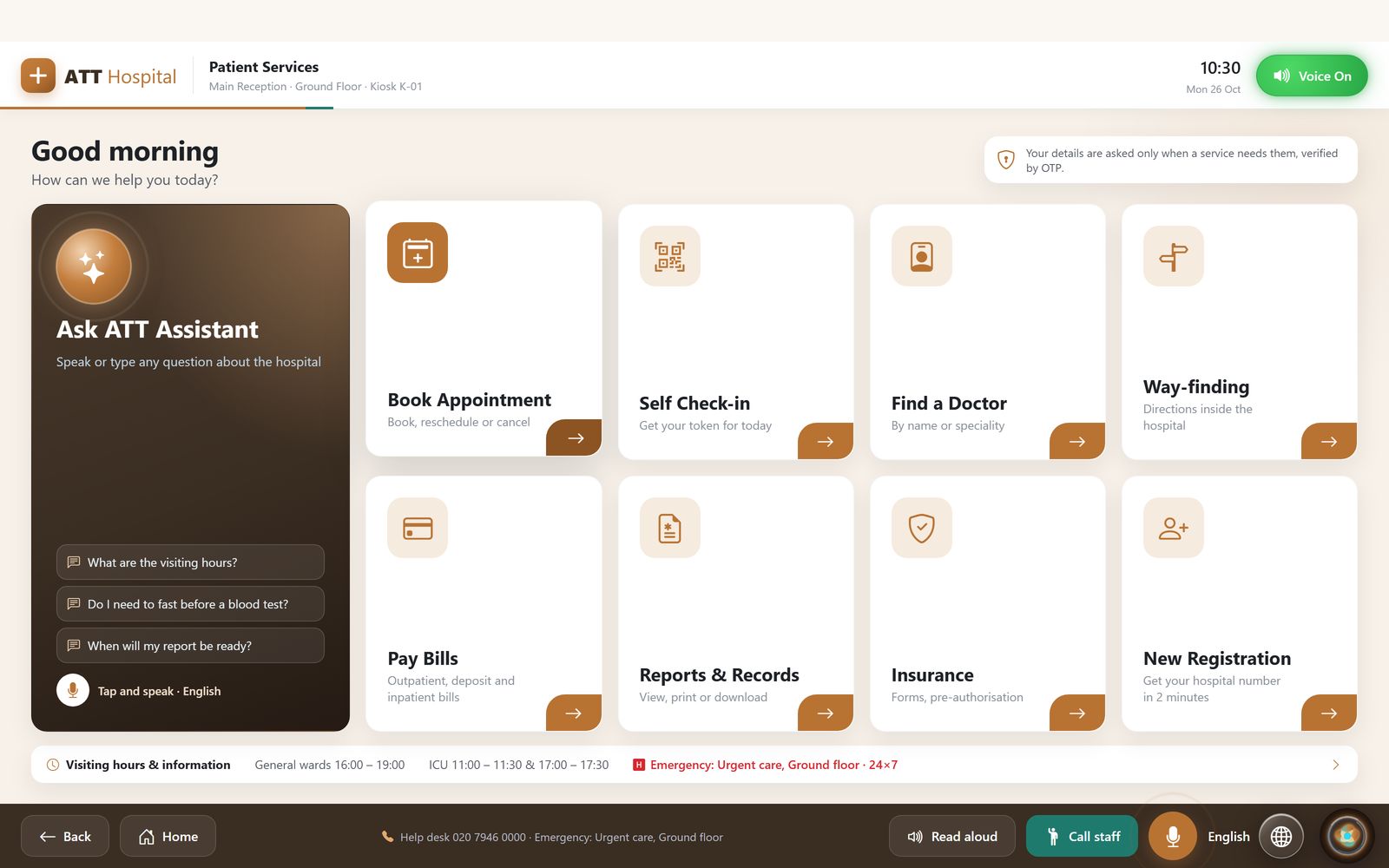
Patient services kiosk
Book an appointment, check in, find a doctor, find the way, pay bills or register, with an assistant that answers questions by text or voice.
-
02
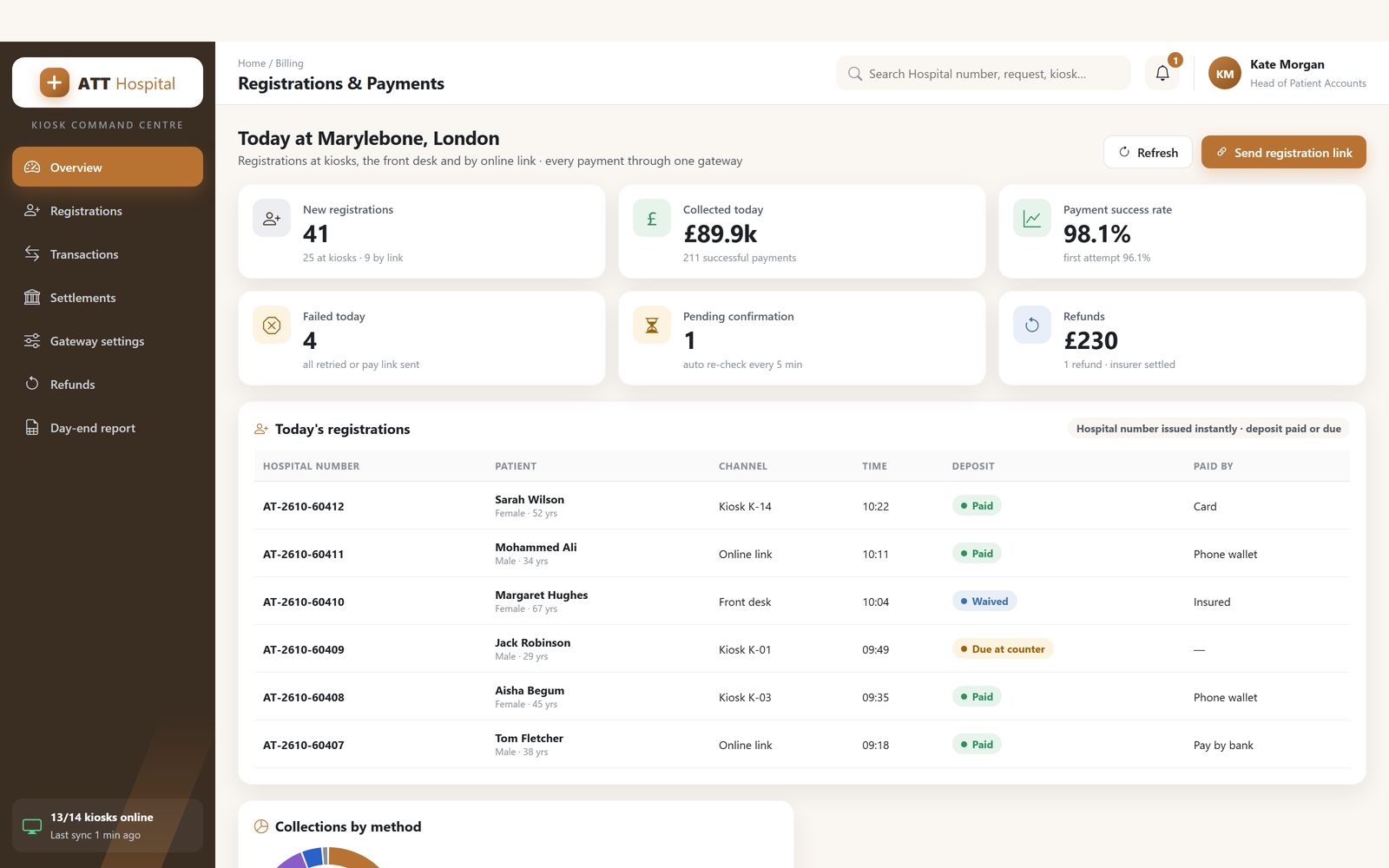
Registrations and payments
Registrations from kiosks, the front desk and online links, with every payment through one gateway.
-
03
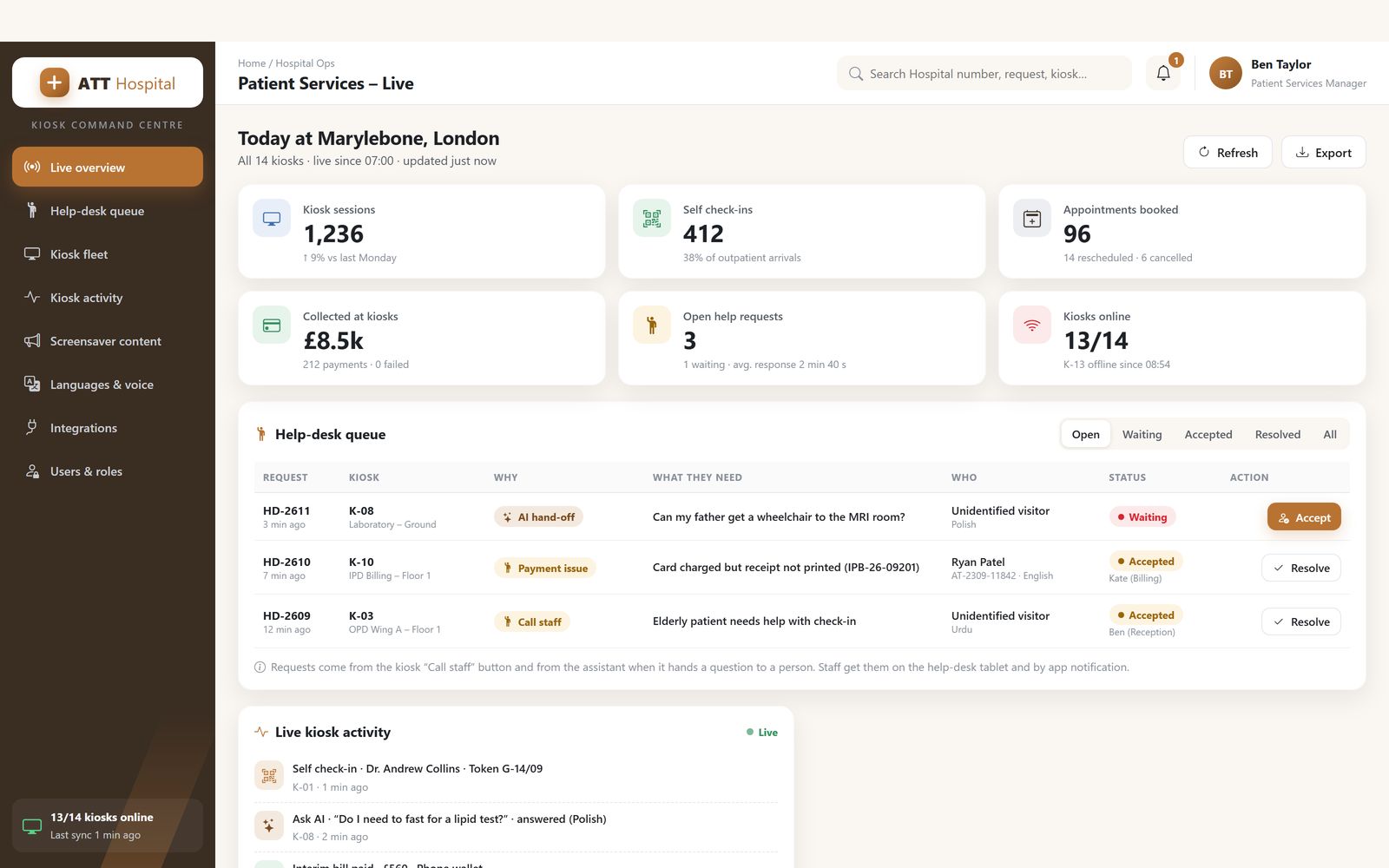
Command centre
Kiosk sessions, check-ins, help requests from the kiosk's Call staff button and the health of every kiosk, live.
-
04
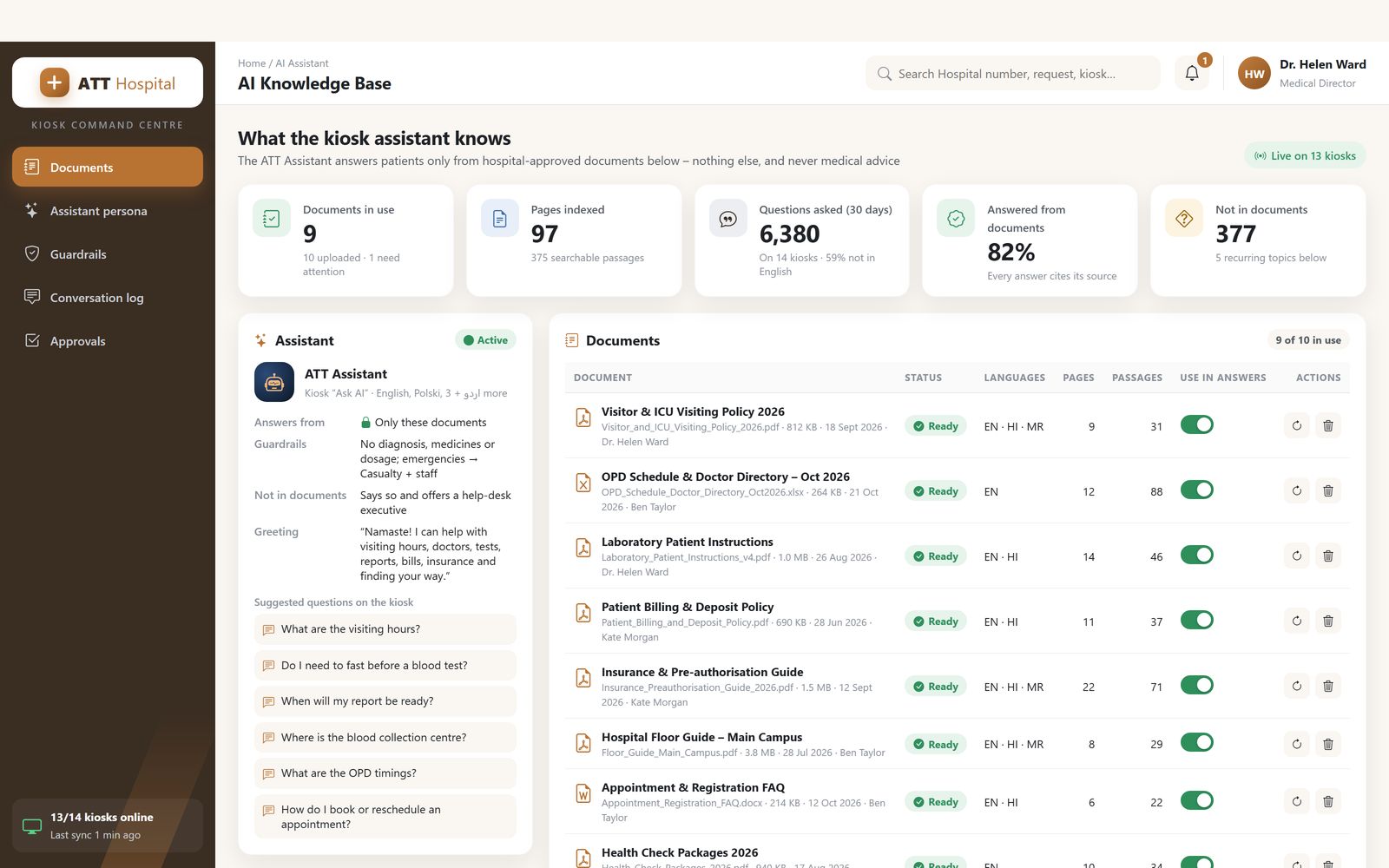
Assistant knowledge base
The documents the kiosk assistant answers from: visiting hours, procedures and patient guides, managed by staff.
What is healthcare kiosk software?
Healthcare kiosk software is the application that lets a patient register, check in and be screened at a self-service touch screen before they see a clinician. It captures identity and demographics from an ID document or a mobile number, creates or finds the patient record in the hospital information system, confirms a booked appointment or creates a walk-in visit, asks the screening questions the department wants asked before consultation, and issues a queue token for the right clinic. Where vital-signs devices are attached, it records blood pressure, pulse oximetry, weight and temperature into the pre-consultation record. Every answer and reading is written to the patient's file through the HIS or EMR interface, so the clinician opens a record that is already complete.
AtashiTech writes this software as a native Windows application for the kiosk hardware a hospital chooses, integrated with the printer, ID reader, camera and clinical devices around it, and with the HIS. It is one of our packaged kiosk and self-service solutions. The kiosk itself, and the medical devices, come from their manufacturers.
Registration is where the outpatient day is lost
Clinics are usually staffed to see patients, not to register them. The front desk becomes the department everyone waits for.
The old way
The outpatient hall fills before the clinics open. Each patient reaches a registration window, gives their name, address, age and phone number to a clerk who types them, presents an insurance card or a health scheme card to be photocopied, and receives a slip and a number. A returning patient gives the same details again because the clerk cannot find them, or finds three of them. The clinician later asks the same screening questions the nurse asked, and takes vitals that could have been taken while the patient waited.
The consequences reach past the queue. Duplicate records mean split histories. Handwritten forms mean transcription errors in the very fields, name, date of birth, allergy, that matter most. Screening questions asked from memory are asked inconsistently, and a patient with an infectious symptom sits in the general hall for an hour before anyone knows. The clerks, meanwhile, are the hospital's least clinical staff doing its most safety-critical data entry.
The AtashiTech way
The patient walks to a kiosk in the hall. A scan of the QR code on their Aadhaar or a mobile number linked to their record fills the demographics; a new patient confirms them on screen rather than dictating them. The appointment is confirmed, or a walk-in visit created in the department they choose. The screening questionnaire runs on the screen in the patient's language, and a response that meets a threshold alerts the triage nurse before the token prints. If the hospital has connected vital-signs devices, the patient records their own readings under on-screen guidance. A token prints, the waiting-area display shows the queue, and the HIS holds a complete pre-consultation record.
Healthcare kiosk software from AtashiTech runs as a Windows executable with an encrypted local database, so registration and token issue continue if the hospital network fails, and the records reconcile to the HIS when it returns.
How it works
Four steps, with the questionnaire and vitals switched on or off per department. A dermatology clinic and an emergency-adjacent fever clinic do not need the same screens.
Identify or register
The patient scans the Aadhaar QR, enters a registered mobile number, or scans the QR from an appointment confirmation. Existing patients are matched to their HIS record; new patients confirm demographics pulled from the document and add what the hospital requires, with a photo if policy asks for one.
Screen
The department's questionnaire runs in the patient's chosen language: presenting complaint, symptom checklist, allergies, current medication, travel or exposure questions in an outbreak. Answers above a threshold alert triage staff immediately. Optional vitals are captured from connected devices.
Check in or book
A booked appointment is confirmed and marked as arrived in the HIS. A walk-in selects a department or consultant and, where the hospital enables it, pays the registration or consultation fee at the kiosk by card or UPI, with an insurance or scheme card recorded for the billing desk.
Token and record
A queue token prints with the clinic, the consultant and an estimated wait, and the waiting-area display shows the queue. The registration, screening answers and vitals are written to the patient's HIS or EMR record, so the consultant opens a complete file.
Core features
Each capability is enabled per hospital and per department, and the questionnaire content is owned by your clinical team, not by us.
Aadhaar and ID-based registration
The Aadhaar QR is parsed on the kiosk to fill demographics; passport MRZ and driving-licence barcodes are read the same way. Online eKYC is available where the hospital holds the required authorisation.
Insurance and scheme card capture
Insurance, TPA and government health-scheme cards are scanned and attached to the visit, with the policy or beneficiary number extracted for the billing and pre-authorisation desk.
Symptom triage questionnaire
Configurable, multilingual and department-specific. Branching logic asks follow-up questions only when they apply, and threshold responses alert nursing staff before the patient sits down.
Appointment booking and check-in
Confirms booked slots from the hospital's scheduling system, marks arrival, and lets walk-ins choose a department or a consultant with the next available time shown.
Queue token and wait display
Tokens print per clinic, and waiting-area screens show the queue by consultant with an estimated wait, driven by the same local service that issues the tokens.
Vital-signs device integration
Blood-pressure monitors, pulse oximeters, weighing scales and thermometers connect over USB, serial or Bluetooth, and readings are captured with on-screen guidance and written to the pre-consultation record.
HIS and EMR integration
Patient lookup, registration, arrival, screening answers and vitals exchanged with the hospital information system over HL7 FHIR or the vendor's API, with a local queue for outages.
Consent, audit and retention
Consent screens per data use, an audit trail of every record created or read, encryption at rest on the device, and retention rules set to the hospital's policy, supporting NABH-style record-keeping and data-protection obligations.
Hardware and integrations
A patient kiosk has two integration surfaces: the devices in the enclosure and the hospital's clinical systems. The software connects to both directly, over the hospital's own network.
Clinical devices and hospital systems
Hospital IT teams want to know what touches the HIS and what the kiosk stores. The table sets that out by layer.
| Layer | What is integrated | How | Data held on the kiosk |
|---|---|---|---|
| Identity capture | Aadhaar QR, passport MRZ, driving-licence barcode; camera for photo | USB reader or camera; OCR on the device | Extracted fields; document image only if policy requires |
| Insurance and scheme cards | Insurer, TPA and government scheme cards | Card scanner, USB | Card image and extracted numbers for the visit |
| Vital signs | Blood-pressure monitors, pulse oximeters, scales, thermometers | USB, serial or Bluetooth device protocols | Readings until written to the HIS |
| Token and display | Zebra and Star thermal printers; waiting-area screens via an Android display app | USB or serial; hospital LAN | Queue state for the day |
| Payments | Card terminal; dynamic UPI QR | Terminal SDK; gateway API | Transaction reference only; no card data |
| HIS, EMR and scheduling | Registration, arrival, screening, vitals, appointments | HL7 FHIR or vendor REST API | Encrypted queue of unsent records during outages |
The HIS and scheduling connectors are built for each hospital's systems by our integration team, and the waiting-area display comes from our Android TV and signage practice. The kiosk application is delivered by our kiosk application development group, and the patient-facing screens, which have to work for an anxious person with poor eyesight and no time, are designed by our UI/UX design team.
Care settings that use healthcare kiosk software
The same intake journey runs in very different buildings. What changes is the volume, the questionnaire and how much is paid at the door.
Multi-speciality hospitals
High outpatient volumes across many departments, each with its own screening needs and consultant queues. Kiosks in the main hall handle registration and department-level tokens; the queue service then carries the patient through billing, investigation and pharmacy counters, the same mechanism that powers our queue management kiosk.
Clinics and polyclinics
A small front desk that doubles as billing. One kiosk that registers, screens and takes the consultation fee means the receptionist can stay with the patients who need a person, and the clinic's records stop depending on handwriting.
Diagnostic centres and laboratories
Patients arrive with a prescription or a booking and need a sample-collection token, a receipt and their identity confirmed for the report. The kiosk scans the booking, captures identity, takes payment, and issues the token; report collection can use the same unit with an OTP.
Corporate and occupational health centres
Campus clinics see employees for periodic examinations and minor illness. The employee's own credential identifies them, the questionnaire is the occupational-health one, and the same badge is used at our employee self-service kiosk elsewhere on the site. Where visitors to the plant need a health declaration, the visitor management kiosk asks it at the gate.
Government health facilities and screening camps
Very high throughput, many languages and limited staff. A questionnaire-first flow with vitals captured at the kiosk lets a camp screen a population and refer the cases that need a clinician, and the offline capability matters more here than anywhere else in this catalogue.
Care that continues at home
Registration ends when the patient leaves the building, but for older patients and people with long-term conditions the care does not. Our remote patient monitoring software keeps the care team in touch with the household after discharge. The registration kiosk and the home product are separate pieces that a hospital group can run side by side.
Deployment, offline operation, AMC and remote management
Patient data raises the bar for every operational decision. This is how the kiosk is installed, run and supported.
Deployment
The kiosk application is installed as a locked-down Windows package on hardware inside the hospital network, never on a device with a public address. The HIS interface is configured and tested against the vendor's test environment, department questionnaires are entered by the clinical team in the content portal, and token and display layouts are agreed with the OPD manager. A pilot normally runs in one department with staff on hand, so that the questionnaire thresholds and the wait-time estimates are tuned against real patients before the hall is converted.
Offline operation
Registration, screening, token issue and the waiting display all continue during a network failure, because the kiosk holds an encrypted local database and the display service runs on the same LAN. Records created offline carry a provisional visit identifier and are reconciled to the HIS in order when the connection returns, with duplicates flagged for the records team rather than merged silently. Card and UPI payments are offered only while their rails are reachable; the screen directs patients to the billing desk otherwise.
Annual maintenance contract
HIS vendors release updates, questionnaires change with public-health guidance, devices are replaced, and Windows patches arrive monthly. The AMC through our consulting and AMC support service covers the software adjustments each of those needs and gives the hospital's IT and OPD teams a support route. Response commitments are agreed per hospital rather than published.
Remote management
A hospital group with kiosks across several buildings or cities manages them through our centralized kiosk management platform: every unit's health and paper level on one screen, alerts when a kiosk or its HIS link goes down, questionnaire and language updates pushed to every site, and remote log access for the support team. Articles on running patient-facing kiosks safely are collected on the blog.
Move registration off the desk
Tell us about your outpatient volumes, the HIS or EMR you run, the departments that need screening and whether you want vitals or payment at the kiosk. We will map the intake journey with your OPD and IT teams, confirm the integration, and quote the engagement. We do not publish prices because hospital integrations vary too much for a list to mean anything.
Frequently asked questions
Related solutions
Doctor Prescription App
An Android app that turns a short form into a numbered, one-page A4 prescription on the doctor's own letterhead and sends it to the patient on WhatsApp. History, repeat prescriptions and medical certificates included; patient data stays on the phone.

Remote Patient & Elder-care Monitoring Software
A home tablet, Wear OS watch, phone apps and a care portal for people looked after at home: medicine reminders, an emergency button, readings and trends, and video calls with carers. Available for pilots; it supports care teams and does not replace clinical judgement.

AI Assistant for Business
A grounded AI assistant that answers only from your documents and website, with citations, voice and human handoff, on your website, apps, kiosks and portal. Separate tenants per company, department or brand. Set up per company.

Bill Payment & Collection Kiosk Software
Bill payment and top-up kiosk software built for your hardware: fetch the bill, take cash, card or wallet payments, print a confirmed receipt and reconcile every note. Integrates your billers, cash acceptor, printer and gateway. Try the live demo.