
A contractor's first day, step by step
Screens from our live demo, with sample data.


-
01
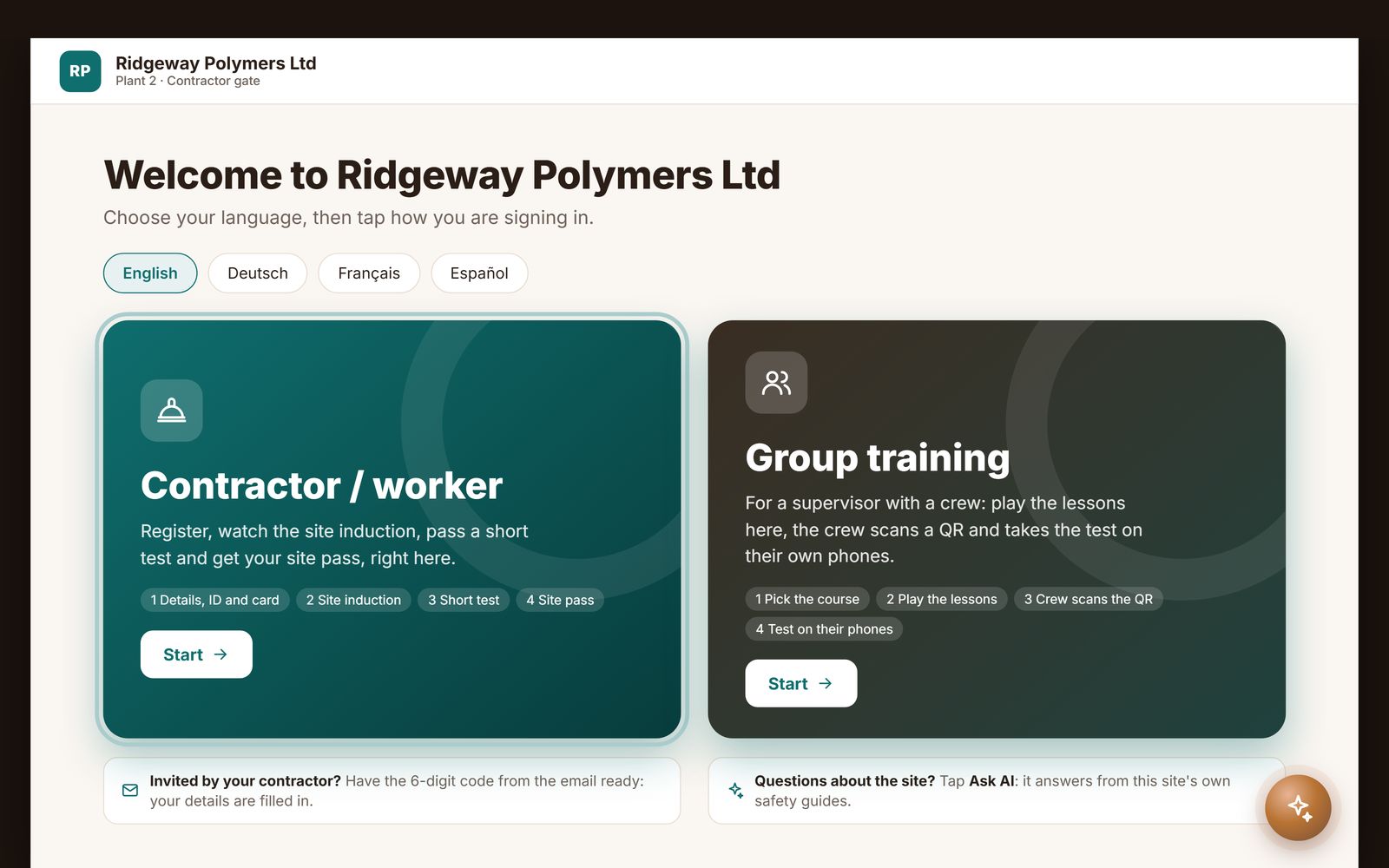
Sign in at the kiosk
A single worker registers and takes the induction; a supervisor can instead run group training for the whole crew.
-
02
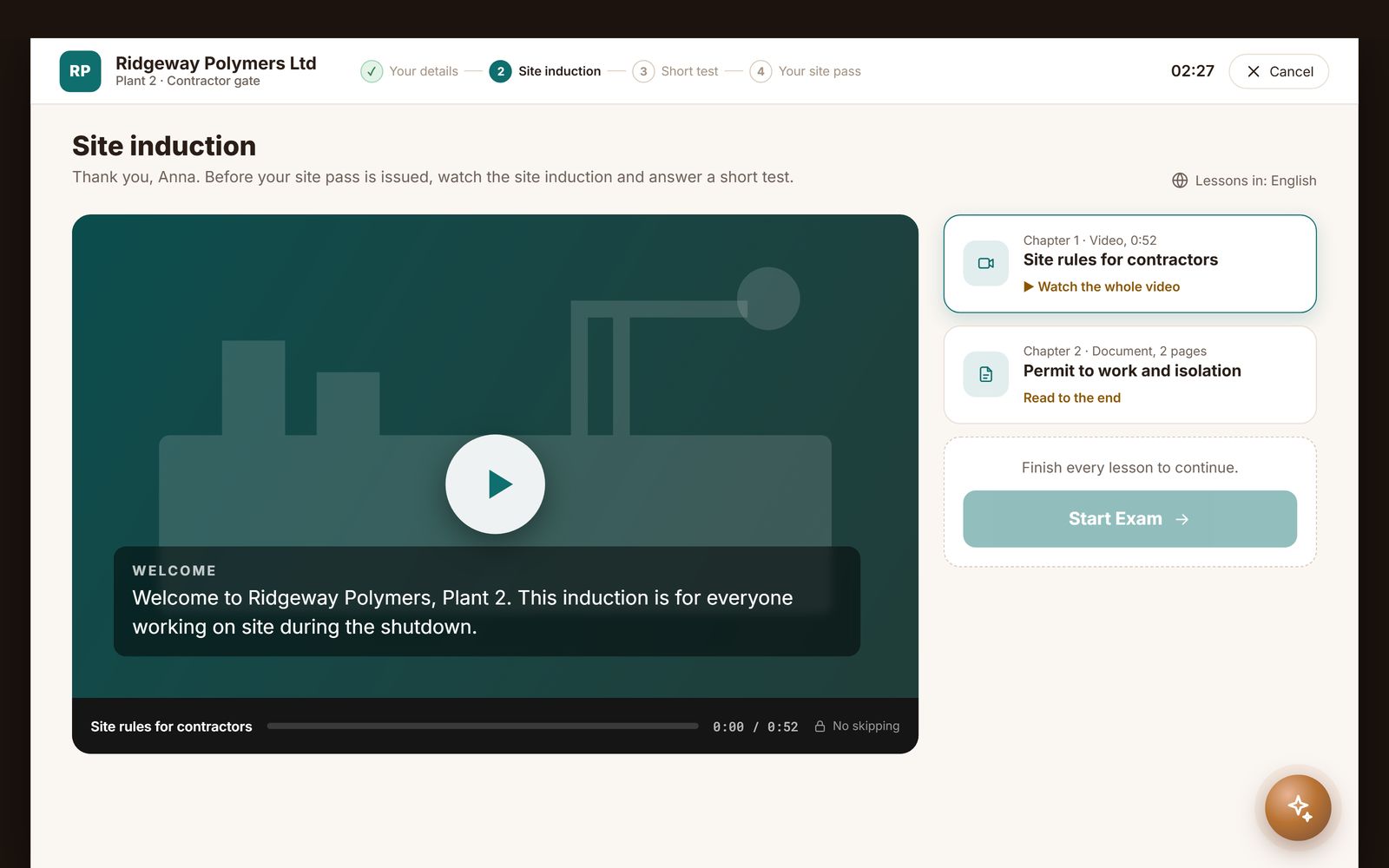
Site induction
Lessons that must play to the end, chapter by chapter, in the worker's language. No skipping.
-
03
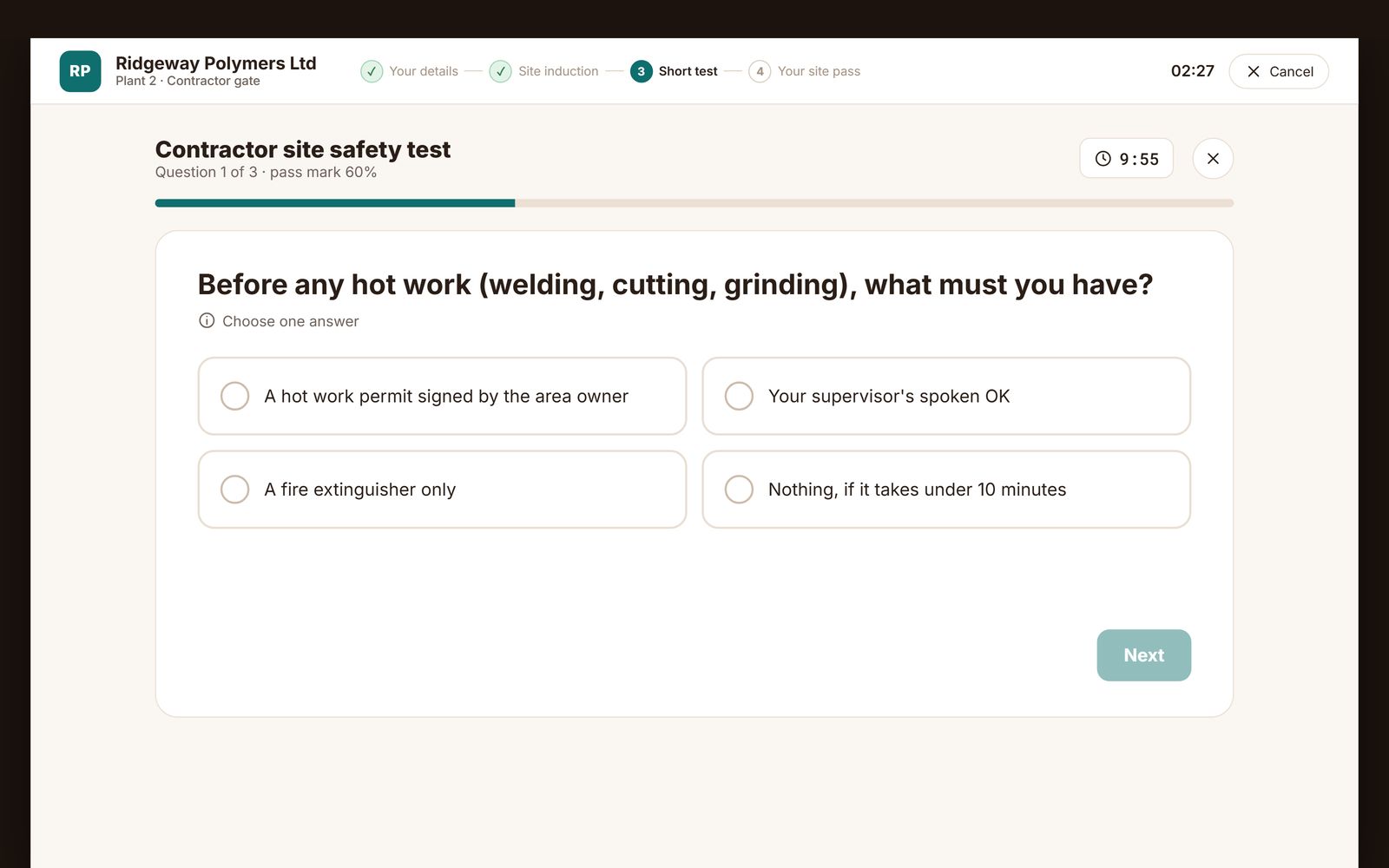
Induction test
A short test with a pass mark. Pass it and the site pass and certificate are issued.
-
04
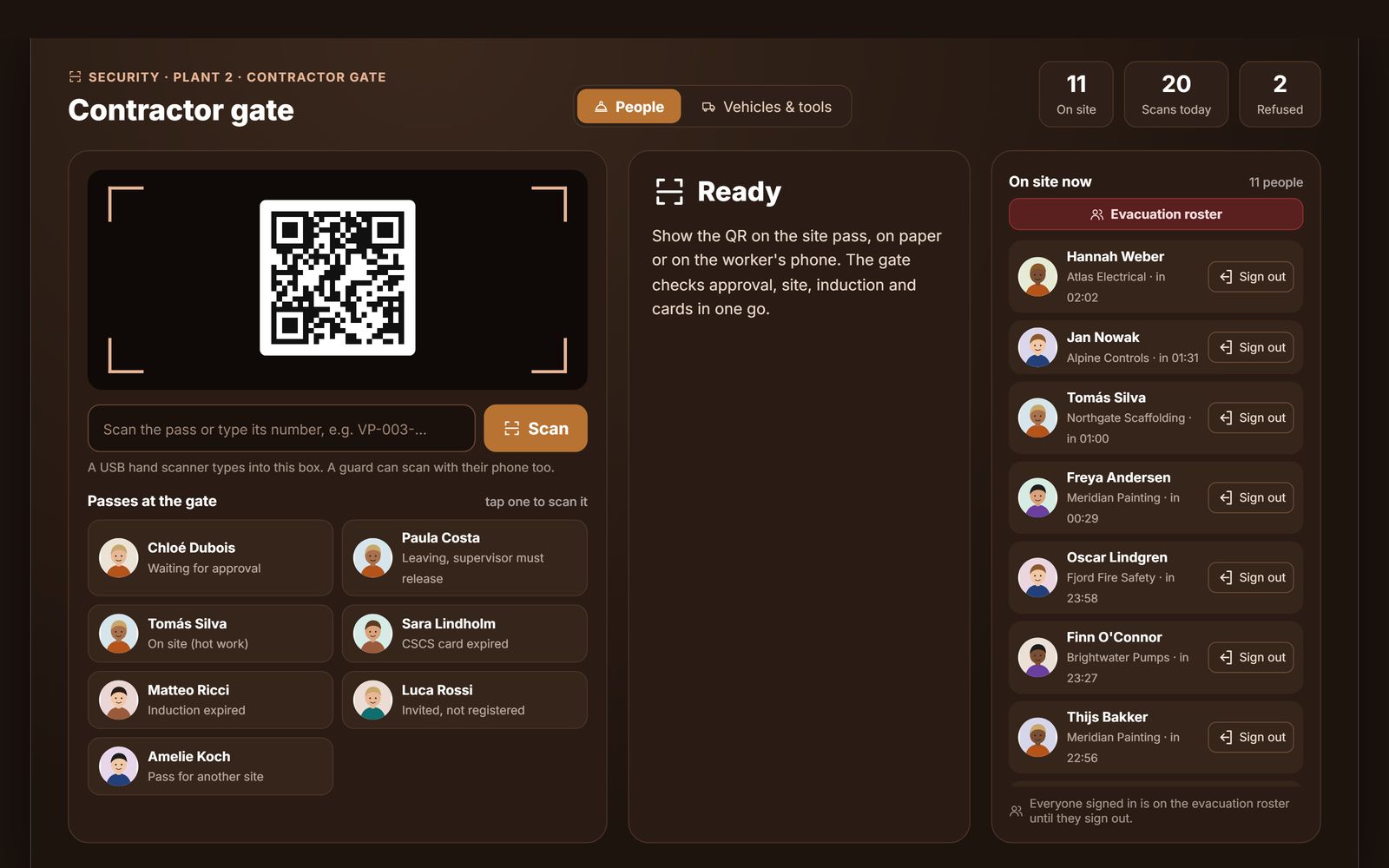
Security gate
The gate scans the site pass and checks approval, induction and trade cards in one go, with an evacuation roster of everyone on site.
-
05
Admin portal
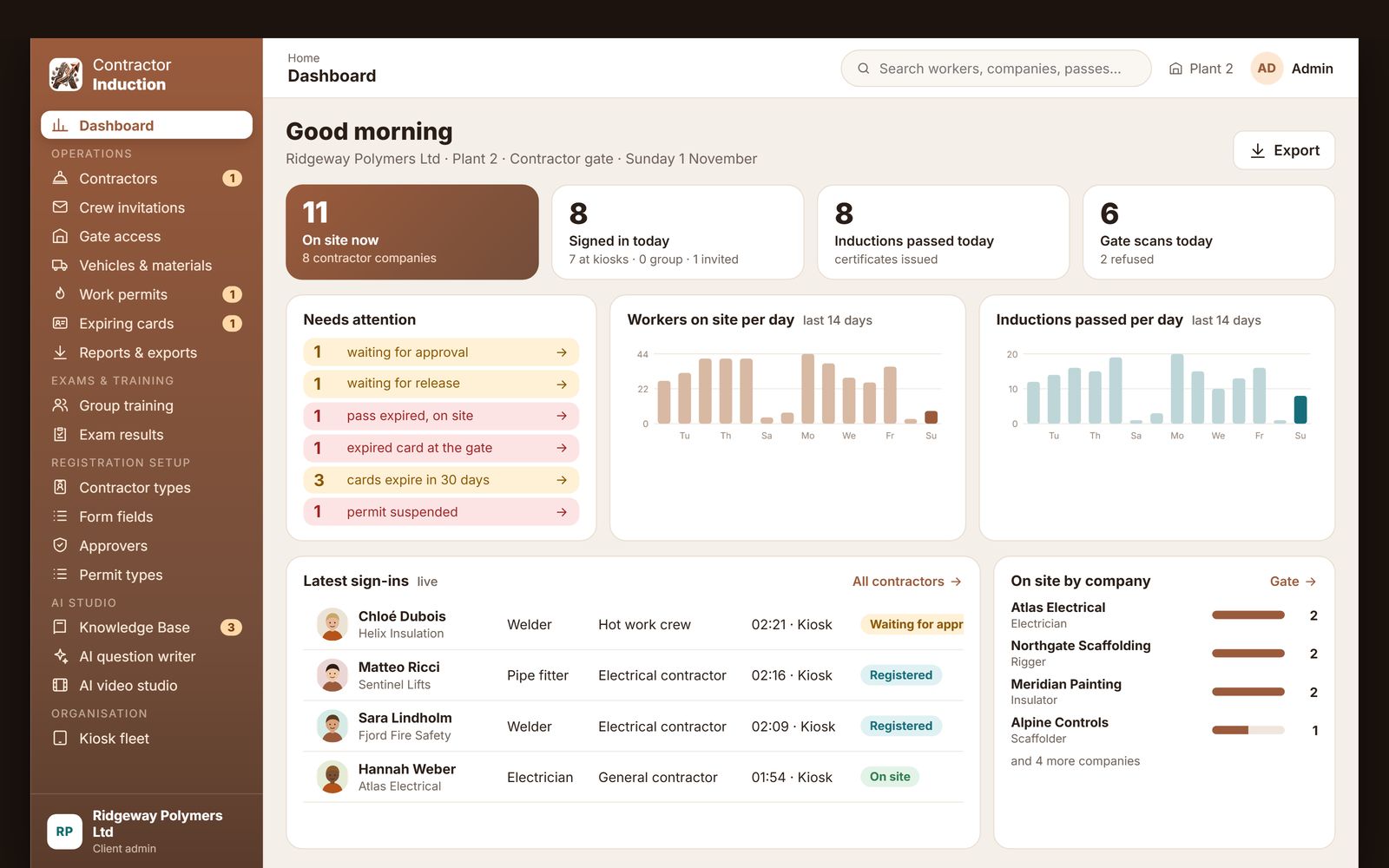
Contractors on site, approvals and releases waiting, expiring cards and inductions passed per day.
What is contractor induction software?
Contractor induction software makes sure every contractor, subcontractor and visiting worker has taken the site's safety induction, understood it and been authorised before they pass the gate. It replaces the slideshow in the site office, the folder of signed attendance sheets and the guess about whether the electrician who turned up this morning was ever inducted. The worker registers, watches the site's lessons, passes a short test, receives a certificate with a QR code and, where the site requires it, waits for a supervisor's approval. The QR pass is then scanned at the gate on the way in and on the way out, so the site always knows which third-party workers are inside.
AtashiTech's contractor induction software runs on an Android tablet kiosk, a Windows kiosk application, a browser kiosk, the workers' own phones through a QR code, an Android app for supervisors and guards, and a web portal for the safety team. It shares its account, its gate and its records with our visitor management software, so a site that already registers visitors adds contractor induction as a setting. Ask for a 14-day free trial from this page: we set up your account and email you the login.
Third-party labour is where site control quietly breaks down
Employees are on a payroll and appear in an HR system. Contractors arrive in a van at seven in the morning, and the person who decides whether they may enter is a guard with a register.
The induction nobody can prove
A manual induction runs like this. A new crew arrives early, the supervisor is busy, so the induction is given later to a group of six by whoever is free, from slides that were last updated when the site layout was different. Six names go on a sheet and the sheet goes into a folder. When an incident happens the folder is searched. If the sheet is found, it proves that a person signed a sheet, not that they watched the briefing, understood the hazards or knew where the muster point was. The site manager has spent hours a week giving inductions and still cannot answer the one question that matters.
Workplace safety law in every market we serve puts the duty on the site to make sure contractors are competent and informed before they work: OSHA standards in the United States, the Health and Safety at Work Act and the CDM Regulations in the United Kingdom, the EU Framework Directive and its national laws, and ISO 45001 wherever it is adopted. What they have in common is that the evidence must be retrievable.
The induction that proves itself
With induction software the worker is inducted by the system, the same way every time. The lessons play on the kiosk or, for a crew, on a screen while each worker answers the test on their own phone. A pass issues a certificate with a QR code; a fail is recorded and can be retaken. The supervisor approves from a notification, the gate scans the pass, and the record shows who was inducted, in what, when, with what result and who approved it.
From registration to gate pass in four steps
The order below is the default. Each site decides which contractor types exist, what each must enter, which lessons they take and whether a test and an approval are required.
Register
The worker registers on the kiosk or on their own phone from the QR poster. They enter the fields the site designed for that contractor type, such as employer, trade and emergency contact, record an ID type, number and photo, and have their photo taken. A returning worker's details are pre-filled from their mobile number.
Take the induction
The site's lessons play in the language chosen on the kiosk: videos that must play to the end without skipping ahead, and documents. A timed test follows with a pass mark set by the site. The test can be switched off per contractor type, in which case the certificate is issued directly.
Approve where needed
Contractor types that need it go to the supervisor or to up to two levels of approvers, who get an email with one-tap Approve and Reject links or a push notification in the Android app. Until approval, the kiosk shows that the worker is waiting and the gate refuses the pass.
Sign in at the gate
The certificate and pass carry a QR code that is scanned on the kiosk, on a USB scanner or on a guard's phone. Sign-out is the same scan on the way out. Where a site wants it, the supervisor releases the worker before they leave, and security can always let someone out with a recorded reason.
One worker record on every device at the gate
Contractor gates range from a gatehouse PC to a tablet in a portacabin. The same account and records serve each of these.
Android tablet kiosk
A tablet on the gatehouse wall, locked to the site flow, running registration, the induction, the test and the gate scanner. It keeps working without a network connection, holding its own copy of the site's settings and lessons, and syncs when the link returns, which matters at remote and dusty sites. Face sign-in lets regular workers sign in without retyping their details.
Windows kiosk application
The same flow on a floor-standing touch kiosk or a gatehouse PC, also offline-capable, with face sign-in and fingerprint sign-in through a supported USB fingerprint reader for sites that want to stop pass sharing.
Browser kiosk
Any screen with a modern browser can run the induction, test, certificate, passes and gate scanner. It needs a connection, so it suits a site office with reliable internet.
Workers' phones and group training
Workers register from a QR poster on their own phone with nothing to install. For a crew, the trainer plays the lessons once on the kiosk, then shows a QR code; each worker scans it, takes the test on their own phone and downloads their certificate and pass, while the kiosk shows a live roster the trainer can manage.
Supervisor and guard app
Supervisors use the Android app to approve or reject registrations from a push notification, see who is on site and release workers at the end of the shift. Guards can scan passes from a phone at a second gate.
What is included
Lessons and timed tests
Upload your own videos and documents, group them into modules per audience, and add a timed test with a pass mark. Every attempt is kept with its result.
Certificate with QR code
A pass issues a PDF certificate with a QR code that opens a digital copy, so a supervisor or auditor can verify it in the field.
Group training
Induct a whole crew in one session: lessons on the kiosk, the test on each worker's phone, and the session recorded against every attendee.
Contractor and vendor types
Separate types with their own form fields, lessons, test switch and approval rules, all designed in the portal.
Two-level approval
By email link on any phone or in the Android app. Level one passes to level two, any rejection ends it, and administrators can override.
Gate scanner and exit release
QR scans on the kiosk, a USB scanner or a phone, with clear verdicts for a wrong site, a used pass or a pending approval, and a hold for supervisor release at exit.
Vehicle and material log
Vans, plant and materials in and out are logged at the gate alongside the people who brought them.
Lessons in your workers' languages
Lesson files and test questions per language, with AI translation of questions in the portal and an AI video studio that turns slides into narrated lessons.
Grievance and speak-up
Workers raise a grievance, give feedback or make an anonymous whistle-blower report from the kiosk or a phone page; anonymity is enforced by the system.
Safety rules, maps and quizzes
Do's and don'ts, manuals and floor maps on the kiosk, plus safety quizzes and a spot-the-hazard game with a leaderboard.
Results and export
Exam results by type, site and date, and each person's full history, searchable and exported to Excel for the client or the auditor.
Multi-site, one account
Each site has its own devices, poster link and records, so the gate knows when a pass belongs to a different site.
Available on every device at the gate
One subscription, one worker record, whichever hardware the site already has.
Evidence without over-collecting
The platform collects only the fields each site configures. Nothing depends on a national identity number; the site chooses which ID types it accepts. Face and fingerprint sign-in are optional, consent is recorded with a timestamp, only a template is stored, and it can be erased from the portal while code and QR sign-in stay available. Anonymous whistle-blower reports keep no photo, site or device. Retention, hosting location and a data-processing agreement are agreed with each customer during onboarding.
Sites that run on contractors
Construction
Phone registration at the hoarding, crews inducted together before the first shift, and passes scanned at the gate from a phone.
Manufacturing plants and shutdowns
Hundreds of temporary workers inducted in groups, area-specific lessons and a gate kiosk that works through a network outage.
Warehouses and logistics
Driver and loading-bay inductions, with vehicles and materials logged at the same gate.
Utilities and energy
Site-specific modules for plants and depots, with approval before a worker's pass is valid.
Hospitals and campuses
Maintenance and service contractors inducted on infection-control and restricted-area rules before entry.
Facilities management
One account across a portfolio of buildings, each with its own induction, and one export for the client.
The same platform also runs worker induction, vendor induction and employee induction, and the wider training programme described on our safety training and compliance kiosk page.
From trial request to first inducted contractor
Request the trial from this page. We set up your account and email your portal login, usually within one business day, with sample lessons and a sample test so you can see the whole flow before uploading anything. Replace the samples with your own videos and documents, set up your contractor types and their fields, print the QR poster for the gate and activate a tablet or the browser kiosk.
Kiosk estates are monitored through our kiosk management platform, and ongoing support comes through our consulting and AMC service.
Need it shaped to your sites?
The platform covers the common journey. When your rules, hardware or systems are different, we build a customised version.
Some sites need more than configuration: permits to work signed at the kiosk, trade cards and licences with expiry dates checked at the gate, refresher inductions enforced on a schedule, a muster roster for evacuations, subcontractor hierarchies by work order, a turnstile or barrier that opens on a valid pass, or contractor hours sent to payroll. Those are built to your requirements on the same platform by our kiosk application development and integration teams, with a pilot first and a contract that names what is being built.
Stop giving inductions. Start proving them.
14 days free. We set up your account and email you the login. Works on the tablet, kiosk, browser or phone your site already uses.
Start your 14-day free trialFrequently asked questions
Related solutions

AI Assistant for Business
A grounded AI assistant that answers only from your documents and website, with citations, voice and human handoff, on your website, apps, kiosks and portal. Separate tenants per company, department or brand. Set up per company.

Bill Payment & Collection Kiosk Software
Bill payment and top-up kiosk software built for your hardware: fetch the bill, take cash, card or wallet payments, print a confirmed receipt and reconcile every note. Integrates your billers, cash acceptor, printer and gateway. Try the live demo.

Centralized Kiosk Management & Remote Monitoring Platform
One console for every kiosk we deliver: enrolment, heartbeats and alerts for silent terminals, crash loops, low battery and peripheral faults, remote screenshot, restart and on-screen message, staged releases, one error log and uptime PDF reports.

Digital Signage Software
Turn any screen into a display you run from a web portal: upload images and videos, build a playlist, pair the screen with a code. Free plan with self sign-up, Android TV app on Google Play and a web player; custom versions for iPad, Windows and your own branding.