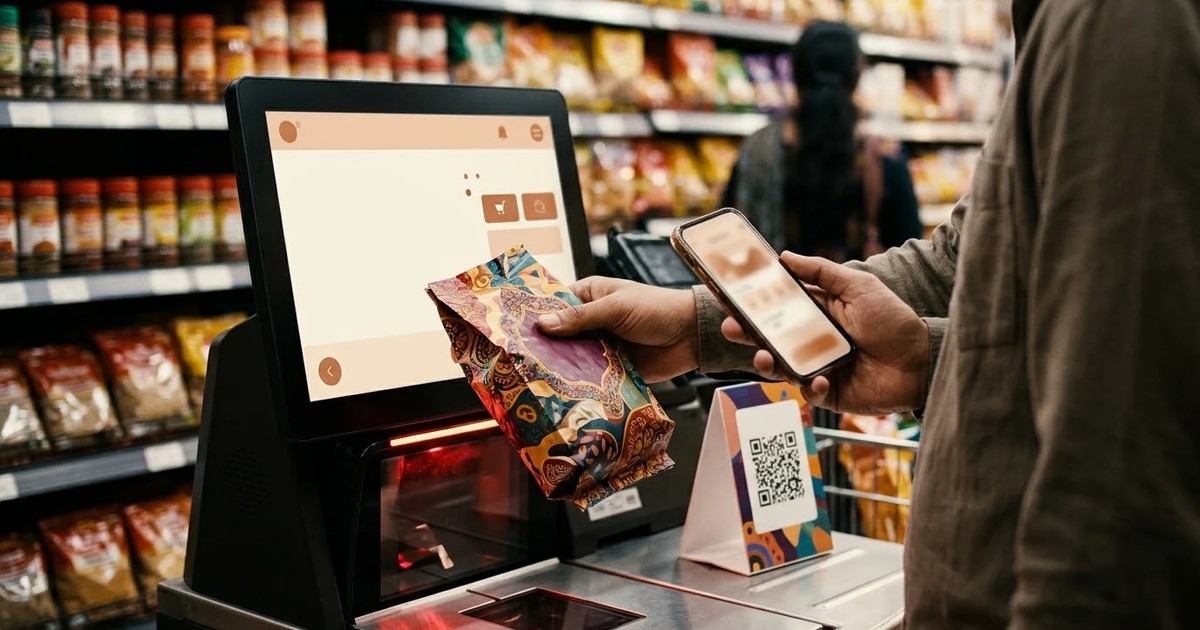
Self-checkout kiosk software lets a shopper scan, weigh and pay for a basket at an unattended unit, with a staff member called only for exceptions. For an Indian store, the software has to handle UPI as well as cards and cash, keep selling when the network drops, and run on the checkout hardware you can actually buy. This guide shows what to check before you pick a vendor.
It is written for a retail operations head or store owner. It is a checklist, not a sales page. If you want the product overview first, read our retail self-checkout kiosk software page.
What self-checkout software does in an Indian store
The software reads each barcode or QR code, finds the price in your product master, and applies offers. It checks the item against a scale, takes payment, prints the receipt and posts the sale to your billing and stock systems. It also decides when a person is needed.
That last part matters most. A lane that calls the attendant for every second basket is slower than a cashier. A lane that never calls anyone loses stock. The rules for the exceptions are where good software and poor software part ways.
Indian stores add a few local needs. Most shoppers pay by UPI. Many stores still take cash. Weak connectivity is common outside the big malls. Shoppers expect loyalty numbers to work with a mobile number. Keep these four in mind through the rest of this guide.
Who it suits, and who it does not
Self-checkout works best for the short-basket shopper: a few items, a quick payment, a hurry. A supermarket in the evening is the classic case. Convenience stores, pharmacies and campus shops also use it, each with different rules.
Payments: UPI, card and cash
Ask for all three, and ask how each one closes the sale.
UPI
The kiosk should show a dynamic QR code for the exact amount and close the sale only when the gateway confirms payment. A static QR that the shopper types an amount into invites mistakes. Ask what the screen offers when the gateway cannot be reached. Our software falls back to card or cash rather than failing silently.
Card
The card terminal should take the payment, not the kiosk. In our design the kiosk sends the amount and waits for the terminal's approval, so card data never reaches the kiosk application. That keeps card handling on the terminal.
Cash
Cash needs a note and coin recycler that gives change. It also needs a day-end reconciliation of the float. If a vendor says cash is "possible", ask which recycler models they have actually integrated.
Receipts and tax invoices
Ask exactly what the shopper gets: a printed receipt, an SMS or link, or both. Then ask where the GST invoice comes from. Many stores produce it in their existing billing system, and the kiosk simply posts the sale there. Settle that split in writing before you start. Our catalogue page does not describe a GST invoice format, so treat that as something to scope, not assume.
Weighing and loss control
Most self-checkout losses come from a few habits: an item left unscanned, a cheap item scanned for an expensive one, or a bag that is never weighed. The usual defence is a bagging scale that compares the added weight with the expected weight of the item just scanned.
The check can be too strict. Bread and a bottle of water do not weigh alike, and a tolerance that suits one will fail the other. Ask whether tolerances can be set per product category. Ours can, which keeps interventions low without weakening the check.
Loose produce needs its own route. Look for a produce scale, a picture menu and a code search, so the shopper can pick "tomato" without knowing a code. Age-restricted lines need a pause until staff confirm the shopper's age, with a record of who confirmed. Those lines vary by store, so check that the restricted categories can be set per store.
Staff assist: the attendant tablet
One attendant usually watches a bank of several units. The attendant needs a tablet that shows each unit's state and the reason it needs help, such as a weight mismatch, an age check or a void. Each clearing action should need the attendant's own login and be recorded.
Ask a vendor how many reasons the software can raise, and whether you can switch some off. A store with a long tail of loose items will want a different list from a pharmacy. Pilot with one bank before you plan the rest.
Offline use during outages
In our design, scanning, weighing, pricing, cash payment and receipt printing run locally, so they carry on during an outage. Prices come from a local mirror of the product master. Completed sales queue on the unit and post to the billing and stock systems, in order, when the link returns.
Card payment depends on the terminal's own connection, which is often separate from the store's data line. UPI needs the gateway. A vendor who says "fully offline" without that distinction is not telling you the full picture. Ask which payment methods survive an outage, and ask to see the screen the shopper gets when one does not.
Android or Windows hardware
Buyers often search for an Android self-checkout kiosk because Android units look cheaper and lighter. That is a fair question. The honest answer is that self-checkout is peripheral-heavy: a scanner-scale, a bagging scale, a card terminal, a cash recycler and a receipt printer. Most of that hardware ships with Windows drivers, OPOS drivers or serial SDKs.
Our retail self-checkout software is a native Windows application for that reason. It integrates the scanner, scale, terminal, recycler and printer built into the unit you choose. We do not make the checkout unit itself. An Android build for a lighter checkout, such as a small store with a few peripherals, is on request and not part of the catalogue page today.
When you compare vendors, ask which operating system runs the unit, and which of your existing devices have a driver for it.
A worked example: a short basket at 7 pm
This is an example to test in a demo, not a customer story.
A shopper has a bottle of milk, a loaf of bread and a bunch of coriander. Here is what a good lane does.
- She scans the milk and bread. The bagging scale accepts each weight.
- She weighs the coriander on the produce scale and picks it from the picture menu.
- She types her mobile number. The loyalty platform returns her points, and an offer applies to the milk.
- She pays by UPI. The screen shows a QR code for the exact amount, and the sale closes when the gateway confirms.
- The receipt prints. The sale reaches the billing and stock systems at once.
Now change the story. The network drops at step 4. A good lane offers card or cash. If the shopper puts an extra item in the bag at step 1, the scale flags a mismatch and the attendant's tablet shows the reason. Ask every vendor to run both versions live.
You can read a longer version in our supermarket self-checkout scenario.
Billing, stock and loyalty links
A self-checkout unit is only useful if its sales land in your books. Ask how the kiosk talks to your billing system and your stock records, and whether sales appear as normal transactions or as a separate batch. Our software posts each sale as a completed transaction and as a stock movement, through APIs, so the numbers do not wait for an overnight run.
For loyalty, a mobile number or card scan should look the shopper up on your platform. Ask which part works offline. In our design, earning points is queued during an outage, while redeeming needs a connection.
Vendor selection checklist
Print this table and fill it in during each demo.
| Area | What to ask | Why it matters |
|---|---|---|
| UPI | Dynamic QR for the exact amount? Sale closes on confirmation? | Avoids wrong or unpaid amounts. |
| Card | Does card data stay on the terminal? | Keeps card handling away from the kiosk. |
| Cash | Which recycler models are integrated? | Many shoppers still pay in cash. |
| Invoice | Where is the GST invoice produced? | Settle it before the pilot. |
| Weighing | Tolerance per product category? | Fewer false alarms. |
| Produce | Scale, picture menu and code search? | Loose items are common in India. |
| Restricted items | Pause, staff approval, logged name? | You keep a record of who checked. |
| Offline | Which payments survive an outage? | Prevents a dead lane. |
| Operating system | Windows or Android, and which drivers? | Decides your hardware. |
| Staff assist | Tablet with reasons and attendant login? | Shows who cleared what. |
| Integration | Billing, stock and loyalty links? | No overnight surprises. |
| Monitoring | Alerts for paper-out and cash faults? | Fixes arrive before shoppers complain. |
Questions to put to every vendor
- Show me a short basket, a loose-produce basket and a mismatch, live.
- What happens to UPI, card and cash when the network goes down?
- Which scanner, scale, terminal and recycler models are already integrated?
- Who produces the GST invoice, and what does the shopper receive?
- Do you supply the hardware, or only the software?
- What is built today, and what is on request?
Running it after go-live
A store that runs several units will want to know which are selling, which have a paper-out or cash fault, and whether the morning's price file reached every shop. Look for a central view that shows each unit's health and can push settings to all of them. Ours is the centralized kiosk management platform.
Ask also about support after launch. Retail changes constantly: new offers, new categories, a replaced scanner. Support through a yearly contract is covered by our consulting and AMC support service, and its terms are set per customer.
When a standard product is not enough
Some stores need a custom flow, a different payment partner or a link to an older billing system. If that is you, say so early. We build custom kiosk software, and you can read about it on our kiosk application development page. To see how a project is run, see how we work, or contact us with your store format and the devices you already have.
To sum up: choose by your messiest basket, not your easiest. Test payments during an outage, not only on a good day. Settle the invoice and the operating system early. Then compare vendors with the table above and our self-checkout kiosk software overview next to it.
Frequently asked questions
Related solutions and services

Retail Self-Checkout Kiosk Software
Self-checkout kiosk software for supermarkets, convenience stores and pharmacies: scanning, scale validation, card, QR and cash payment, loyalty and attendant alerts, synced with your POS and inventory and working offline.
Learn more
Kiosk Application Development
Windows/.NET kiosk apps with peripheral integration.
Learn more
Centralized Kiosk Management & Remote Monitoring Platform
One console for every kiosk we deliver: enrolment, heartbeats and alerts for silent terminals, crash loops, low battery and peripheral faults, remote screenshot, restart and on-screen message, staged releases, one error log and uptime PDF reports.
Learn moreMore from the blog
Doctor Prescription App: What It Does and How to Choose One
What a doctor prescription app does, how it compares with a paper pad, what to check during a trial and who it suits. Includes a worked OPD example and a buyer's checklist.
How to Choose a Visitor Management Kiosk for Your Office
A buyer's guide to the visitor management kiosk: what to check on sign-in, approvals, the gate, offline use and visitor data, with a checklist table.
The Importance of Offline Kiosk Software for Operations
Discover the significance of offline kiosk software for operations managers facing unreliable connectivity. Ensure seamless service delivery with the right solutions.
Tell us the journey, the sites and the hardware you already have — every engagement is scoped and quoted individually.