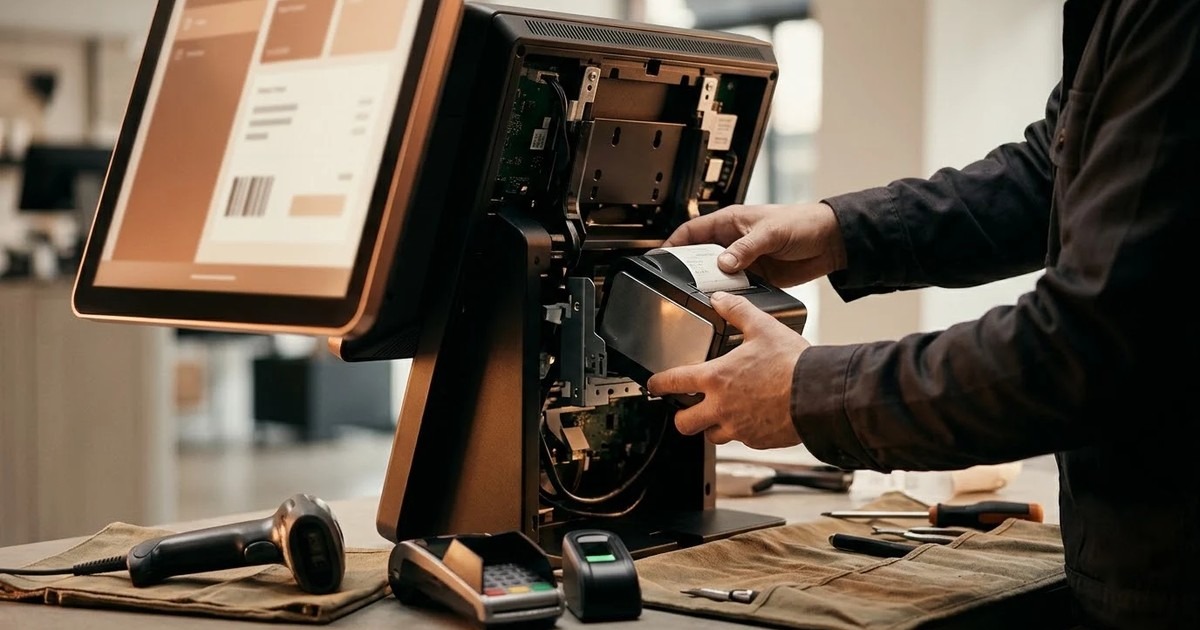
Kiosk hardware integration means making every device inside the enclosure work with your software: the receipt printer, barcode scanner, card terminal, cash acceptor, ID reader, fingerprint reader and the gate. Plan it as its own work stream. Most kiosk projects fail at the points where software meets a device, not on the screens.
This guide is for IT leads and solution architects. It covers what to settle before you order hardware, how each device type behaves, what an access gate needs, and how to test. Our kiosk application development service is built around the same approach.
Start with the parts list, not the screens
Write down every device by make and model before design starts. The model matters because two printers from one maker can use different drivers. The parts list is the specification for the integration layer.
Then ask one question for each device: how will the software talk to it? There are usually four routes.
- The manufacturer's SDK. The best route when it exists. It exposes status and error codes, not just "print this".
- OPOS or a similar standard driver. Common for receipt printers, scanners and cash drawers. Behaviour varies a little by maker.
- A raw serial or USB protocol. Used by many note acceptors. You send documented commands and read replies.
- A browser print dialog. This is the weakest route. A kiosk cannot recover from a dialog it cannot see.
If a device has none of the first three, treat it as a risk and raise it early.
Why a native Windows application suits hardware
A web page locked into a browser cannot reach most device SDKs. It cannot report a paper jam. It cannot restart itself when it hangs. For a kiosk with several peripherals, a native Windows executable is the safer base. That is how we build kiosk applications: as .NET executables that call the device SDKs directly and keep working when the network does not.
If you are still choosing between approaches, see Windows executable vs Android kiosk.
Receipt and badge printers
Printers cause more kiosk faults than any other device. Paper runs out, jams happen and the lid gets opened.
- Pick a thermal printer built for kiosk duty, with a presenter or a retract feature so the paper is not left hanging.
- Read status before every print: paper low, paper out, jam, cover open, offline.
- Keep a print queue. A receipt that fails should print again once the fault clears, not vanish.
- Show a specific message on screen, such as "Receipt printer out of paper", not a frozen screen.
- Agree the receipt layout with the team that will use it, for example finance.
Paper-low and jam status should also reach the back office, so staff refill paper before a kiosk stops.
Barcode, QR and document scanners
Barcode and QR scanners are simple but need testing with real material. A scanner that reads a screen well may struggle with a creased paper bill. Test with the worst paper you expect, in the lighting where the kiosk will stand.
ID and passport readers need more care. They return an image and, often, text read from the document. Decide early what the software stores, because that is personal data. Decide how long you keep it and who can see it.
Card terminals and cash acceptors
Take card payments on a certified payment terminal and keep card data out of your application. The kiosk then exchanges only the amount and the result with the terminal. That keeps your software out of the sensitive part of the payment flow. Two cautions apply. The terminal has its own link to the bank, so decide what the screen shows when that link is down. And a payment that succeeds while the receipt fails must be handled with a rule, not by hand.
Cash devices add more. A note acceptor validates and counts each note, and the software must record every note event. A recycler returns change. Common failure points:
- A power cut in the middle of a payment.
- Cash accepted, but the biller or the network says the payment failed.
- A full cash box, or a jam in the acceptor.
For each one, write down the rule first: reverse, refund or hold for review. Then build the screen and the log entry for it. Our bill payment kiosk software page shows how this works for cash, card and UPI collection, including the day-end reconciliation.
Fingerprint, face and ID readers
Biometric devices usually come with a vendor SDK. The main questions are practical.
- Is the biometric step optional, with consent recorded?
- Where is the template stored, and can the kiosk work if the server is unreachable?
- What is the fallback when a finger will not read, for example a card or a code?
- Does the reader work in the sunlight or glare of the actual site?
Never make biometrics the only way in. People have worn fingerprints, bandaged hands and bright lobbies.
Integrating with access gates and turnstiles
A visitor pass is only useful if the gate checks it. The kiosk decides whether a person may enter, and the gate opens or stays shut. There are two common ways to connect the two.
- Relay or contact output. The software closes a relay for a moment to release a turnstile or door when the pass is valid.
- Wiegand access control. The software talks to an access controller that already runs your doors. We can integrate Wiegand access control on a kiosk build.
Whichever you pick, settle these points with the gate supplier:
- Who is the master: the access controller or the kiosk software?
- What happens when the network drops? The gate should fail in a way your safety rules allow.
- Is there a manual override for security, and is it logged?
- How does a pass work for exit as well as entry?
In our visitor management software, the gate check is a QR pass scanned on the kiosk, a USB scanner or a guard's phone. The guard sees a clear verdict. Turnstiles and door controllers are built on request, not shipped as standard. If you need one, say so at the start so it goes into the hardware specification.
Watchdogs and recovery
Hardware fails in the field, often when nobody is there. Build for recovery from day one.
- A watchdog service restarts the application if it stops.
- The application replaces the Windows shell, so there is no desktop or key combination to escape to.
- The machine recovers on its own after a power cut.
- Each device sits behind a small interface that reports its status. A missing scanner then shows as a specific message on screen and in the log.
- Transactions are written to a local store first and synced later, so an outage does not lose them.
An optional health agent can send uptime, device status and errors to a central dashboard, with alerts for low paper or a cash box near capacity.
Test on the real device
A simulator will not show you a jammed printer or a misread barcode. Test each build on the real target hardware, and start with peripherals, because that is where surprises sit.
A worked example: a bill payment kiosk test run
This is an example of a test plan, not a customer story. Take a floor-standing kiosk with a thermal printer, a note acceptor, a card terminal and a QR scanner.
- Pay a bill in cash and check the receipt, the cash ledger and the back-office record all agree.
- Pull the printer paper mid-session. The screen should show a clear message and the receipt should print after the refill.
- Unplug the network cable during a cash payment. The kiosk should accept, count and store the payment locally, then sync.
- Switch off the power during a payment. After restart, the transaction should be resolved by the rule you wrote.
- Unplug the scanner. The kiosk should hide the scan option or say what is wrong.
- Fill the cash box to its limit. An alert should reach the back office.
Run the list on every new hardware batch, not only the first unit. Components change between batches.
Questions to ask a vendor
- Which of my devices do you integrate through an SDK, and which through a serial protocol or OPOS?
- What does the screen show when each device fails?
- Can I see a failed-payment case handled live?
- What happens to a transaction if power or the network is lost mid-way?
- Who tests on the real hardware, and when?
- How are drivers and SDK updates handled after go-live?
- Who owns the source code and the installer at the end?
Note one thing about scope. A software company writes the application and the integration layer. Enclosures and peripherals come from their makers. AtashiTech is a software company and does not manufacture hardware, so we are happy to review a parts list before you order.
Packaging, updates and cost
Package the application as an installer that runs silently, so IT can push it with the tools it already uses. Add an update agent so a fleet can be upgraded without site visits. For what drives the budget of a project like this, read our guide to kiosk software cost.
Next step
Send us the parts list and a short description of the journey, including the failure cases. We will tell you what is standard, what needs an SDK and what is built on request. See our kiosk application development page, or contact us.
Frequently asked questions
Related solutions and services

Kiosk Application Development
Windows/.NET kiosk apps with peripheral integration.
Learn more
Bill Payment & Collection Kiosk Software
Bill payment and top-up kiosk software built for your hardware: fetch the bill, take cash, card or wallet payments, print a confirmed receipt and reconcile every note. Integrates your billers, cash acceptor, printer and gateway. Try the live demo.
Learn more
Visitor Management Software
Replace the visitor book with invitations, two-level approvals, a short safety induction and QR gate passes, on an Android tablet, a Windows kiosk, any browser or the visitor's own phone. Works offline. 14-day free trial.
Learn moreMore from the blog
Doctor Prescription App: What It Does and How to Choose One
What a doctor prescription app does, how it compares with a paper pad, what to check during a trial and who it suits. Includes a worked OPD example and a buyer's checklist.
How to Choose a Visitor Management Kiosk for Your Office
A buyer's guide to the visitor management kiosk: what to check on sign-in, approvals, the gate, offline use and visitor data, with a checklist table.
Self-Checkout Kiosk Software for Indian Retail: A Buyer's Guide
What to check in self-checkout kiosk software for an Indian store: UPI, card and cash, weighing, offline use, Android or Windows hardware, and staff assist.
Tell us the journey, the sites and the hardware you already have — every engagement is scoped and quoted individually.